

PoCXP Management
Automatic PoCXP Power Management
Power over CoaXPress (PoCXP) is a feature that allows the transmission of power along with data over coaxial cables. This technology is part of the CoaXPress standard. The PTU (Power Transmitting Unit) is responsible for delivering power to the device safely and in compliance with the CoaXPress standard.
KAYA's software stack continuously monitors the CoaXPress connection state and automatically enables or disables PoCXP as needed.
When supported, the frame grabber can power a connected camera in the background, even if KAYA Vision Point, KAYA Vision Studio, or any other KAYA API-based application is not running.
This enables faster and more seamless connection to compatible CoaXPress cameras.
Automatic PoCXP management is the recommended method for controlling PoCXP, as it eliminates the need for manual power management and ensures that camera power is applied only when required.
If you require more precise control over when PoCXP is enabled or disabled, refer to the following sections, which describe the available PoCXP control commands.
Feature Availability
Automatic PoCXP power management requires compatible hardware, firmware, and software.
To determine whether the feature is available in your system, read the PoCXPAutoAvailable frame grabber parameter.
- Yes – Automatic PoCXP power management is supported.
- No – The current hardware, firmware, software, or camera configuration does not support this feature.

Controlling PoCXP Power Management
When the feature is supported, the following commands can be used to control automatic camera connection monitoring and the PoCXP power state.
Turn PoCXP Off
To immediately disable PoCXP power, execute the CxpPoCxpTurnOff command.
Note: Once PoCXP has been turned off using CxpPoCxpTurnOff, execute CxpPoCxpAuto to re-enable automatic PoCXP management. The frame grabber will then restore power automatically when a compatible camera is detected.
Enable Automatic PoCXP Management
To enable automatic camera detection and PoCXP power management, execute the CxpPoCxpAuto command.
When enabled, the frame grabber continuously monitors the selected CoaXPress connection(s) and automatically enables or disables PoCXP based on the presence of a connected camera.
Check the Current Status
To read the current PoCXP monitoring status, read the CxpPoCxpStatus parameter.
Possible values include:
- Off – PoCXP is disabled.
- Auto – Automatic camera monitoring and PoCXP management are enabled.
Channel Selection
The CxpPoCxpTurnOff, CxpPoCxpAuto, and CxpPoCxpStatus parameters follow the GenICam SFNC standard with the following KAYA-specific extension:
The CoaXPress channels affected by these commands are determined by the current value of CxpPoCxpHostConnectionSelector.
- If CxpPoCxpHostConnectionSelector = -1, the command applies to all available CoaXPress channels.
- If CxpPoCxpHostConnectionSelector is set to a specific channel number, the command applies only to the selected channel.
This allows PoCXP power management to be controlled globally or independently for each CoaXPress channel.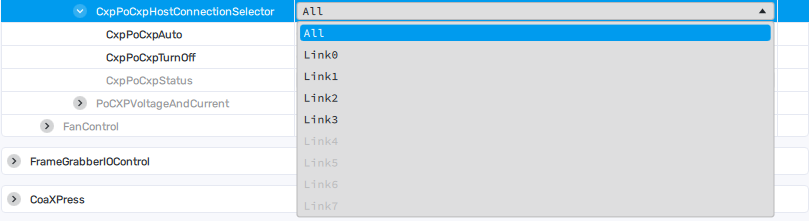
Automatic PoCXP control parameters
| Parameter | Description | GenICam Name | Type | Possible Values | Remarks |
|---|---|---|---|---|---|
| PoCXPAutoAvailable | Indicates whether automatic PoCXP power management is supported. | PoCXPAutoAvailable | Enumeration | 0 = PoCXPAutoAvailableOff 1 = PoCXPAutoOn | Availability depends on the hardware, firmware, software, and connected camera. |
| CxpPoCxpHostConnectionSelector | Selects the CoaXPress device link to which the command or parameter applies. | CxpPoCxpHostConnectionSelector | Enumeration (Selector) | -1 = All 0 = Link0 1 = Link1 2 = Link2 3 = Link3 4 = Link4 5 = Link5 6 = Link6 7 = Link7 | When set to -1, commands and status parameters apply to all available CoaXPress links. |
| CxpPoCxpAuto | Enables automatic Power over CoaXPress (PoCXP) management for the selected device link. | CxpPoCxpAuto (CxpPoCxpHostConnectionSelector) | Command | — | Starts automatic camera detection and PoCXP power management. |
| CxpPoCxpTurnOff | Disables Power over CoaXPress (PoCXP) for the selected device link. | CxpPoCxpTurnOff (CxpPoCxpHostConnectionSelector) | Command | — | Immediately turns PoCXP off. |
| CxpPoCxpStatus | Returns the current PoCXP status for the selected device link. | CxpPoCxpStatus (CxpPoCxpHostConnectionSelector) | Enumeration | -1 = Mixed 0 = Auto 1 = Off 2 = Tripped | Mixed – Different device links have different states. Auto – Automatic PoCXP management is enabled. Off – PoCXP has been disabled by the CxpPoCxpTurnOff command. Tripped – PoCXP protection has been triggered due to an overcurrent or fault condition. |