Adjust buffer size
Buffers Per Stream
Vision Point
In Vision Point legacy this parameter is called Frames Per Stream.
In the GUI it can be adjusted under: Frame Grabber Properties → Extended Stream Features → Camera Selector → Image Format Control → Frames Per Stream
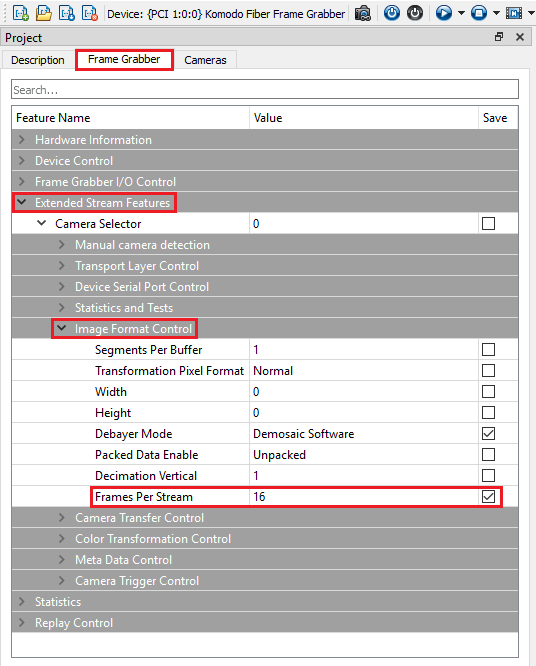
This parameter defines the number of frames to be allocated for the stream’s memory buffer. When the function KYFG_StreamCreateAndAlloc() is used with the frames parameter set to 0, the Queued Buffer mechanism uses its own configuration for the number of frames to allocate for the stream. This prevents the frame memory from being modified until the user resubmits the frame.
Vision Point II
In Vision Point II this parameter has a new name: Buffers Per Stream

Use KYVPLibTL_DSAllocAndAnnounceBuffer() to allocate and announce a buffer and bind it to a specific stream. In most cases, you should allocate buffer memory corresponding to the size of a full frame. For continuous acquisition, several buffers must be allocated to prevent the hardware from dropping incoming frames.
Segments Per Buffer
Accumulate frames into a single buffer using "Segments Per Buffer". This feature is commonly used for high-speed line-scan cameras, but it can also be useful in any high-frame-rate scenario.
The stream callback is triggered each time a frame buffer is completely filled and the execution of the previous callback has already finished. However, the stream callback cannot reliably handle update rates exceeding 10,000 times per second, depending on CPU and software capabilities.
To resolve this limitation, you can accumulate multiple frames/lines into a single buffer using the "SegmentsPerBuffer" parameter on the grabber. This approach reduces the callback frequency, as the stream callback will be invoked only when the buffer containing the specified number of frames/lines is completely filled.
Segments Per Buffer parameter must be set only after a camera has been connected and opened (camera detection process).
- The default value of 'SegmentsPerBuffer' is `1`, meaning the stream callback will occur for every single frame/line captured.
- 'SegmentsPerBuffer' is a grabber setting applied per camera. For details on configuring grabber parameters per camera.
- Memory Consideration:
- Increasing the 'SegmentsPerBuffer' value requires adjusting the size of the acquisition buffers accordingly.
- In this case, the required memory, reported by the function `KYFG_StreamGetInfo()` with the `KY_STREAM_INFO_PAYLOAD_SIZE` info command, will increase proportionally.
- For example, if a camera has a frame size of 640x480 and 'SegmentsPerBuffer' is set to `10`, the buffer size will increase to accommodate `10` frames.
Vision Point
In the GUI it can be adjusted under: Frame Grabber Properties → Extended Stream Features → Camera Selector → Image Format Control → Segments Per Buffer
To configure the 'SegmentsPerBuffer' parameter first specify camera selector, then adjust the value.
KYFG_SetGrabberValueInt(handle, "SegmentsPerBuffer", 1); // Set Segments Per Buffer value
Vision Point II
In the GUI it can be adjusted under Stream parameters:
